SalesOn for your business
Inventory management for distributors
Review product stock by godown, configured batch and expiry records, and the stock context behind ordering, billing and van operations.
₹0 SalesOn account setup · Minimum 2 users · Monthly billing available · Support included
Businesses using SalesOn DMS



Also used by
- Durest Mattress
Explore the product detail
Godown stock example
SalesOn-style godown stock view. Example data; confirm your required stock controls in a demo.
Open the full image ↗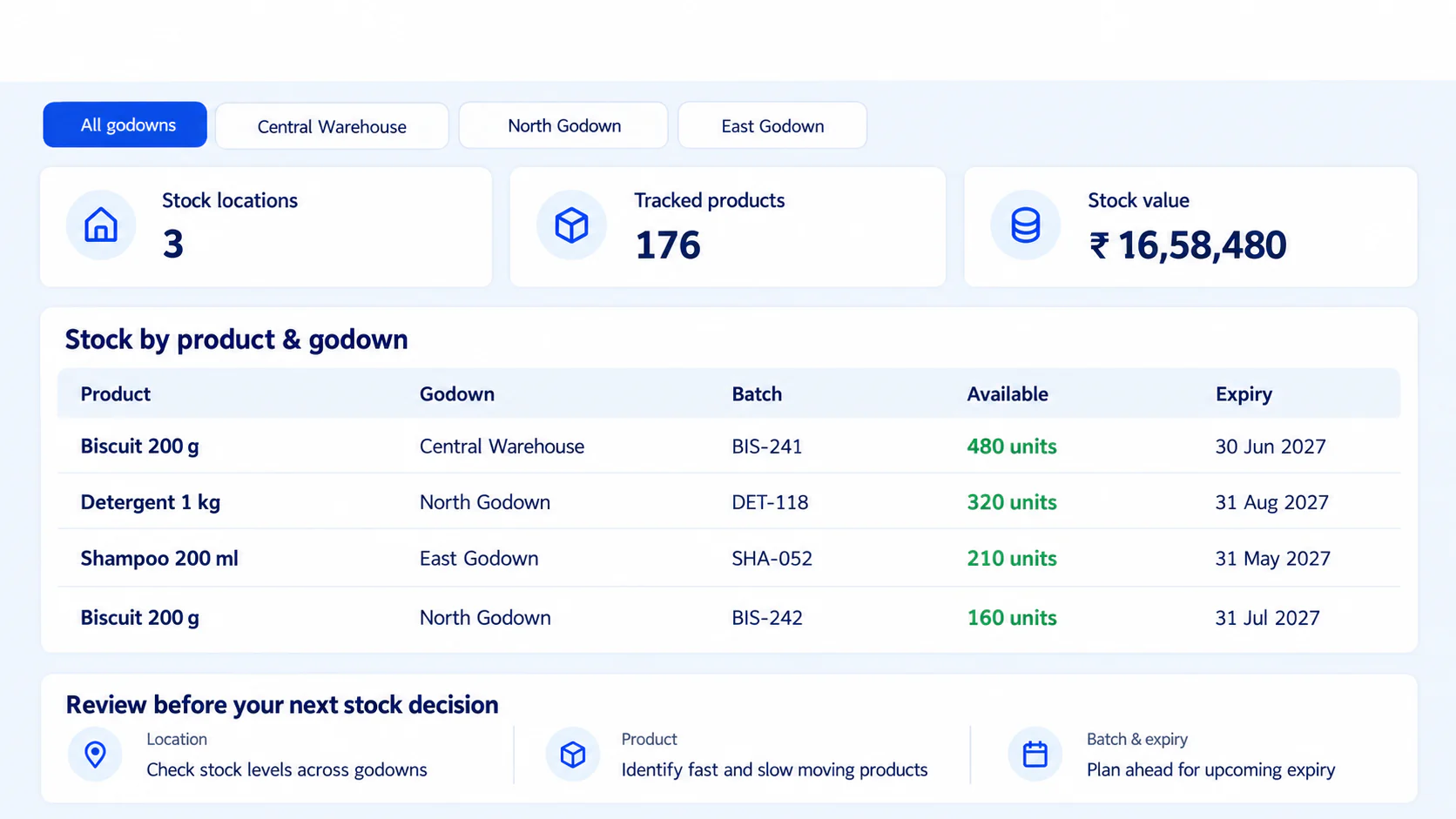
Review product availability by godown
SalesOn DMS supports stock visibility across multiple godowns. Compare where goods are available before the office allocates supply or prepares fulfilment. Review the item, quantity and location. For the connected order-to-dispatch workflow, see DMS.
For products managed with batch and expiry records, SalesOn lets the team review that information alongside stock. Confirm the controls needed for your categories during the demo.
Keep warehouse stock and van stock distinct
Van Sales has its own load, sale, return and closing-stock review. It is included in Enterprise. If goods move from a godown to vehicles, ask the team to show your actual movement and reconciliation process rather than assuming a loading sheet alone updates inventory.
Use free planning tools for a separate task
The free reorder calculator helps plan quantities; the purchase order tool prepares a document. They do not automatically create a cloud inventory receipt or purchase bill. Product inventory is the operational workflow evaluated in SalesOn.
What should we check before rollout?
- Product list, selling units, opening stock and godown structure.
- Whether batch, expiry, serial-number or specialist controls are needed; confirm the exact supported scope.
- The user who can change stock records and how exceptions are reviewed.
- Your accounting transaction types and Tally configuration.
This page establishes multi-godown visibility and configured batch/expiry review from the published DMS workflow. It does not promise a full warehouse-management, barcode-scanning or demand-forecasting system. SalesOn needs internet.
Make the next step practical
See it with your own working day.
Bring an order, an invoice or the process you want to improve.