What does this run need?
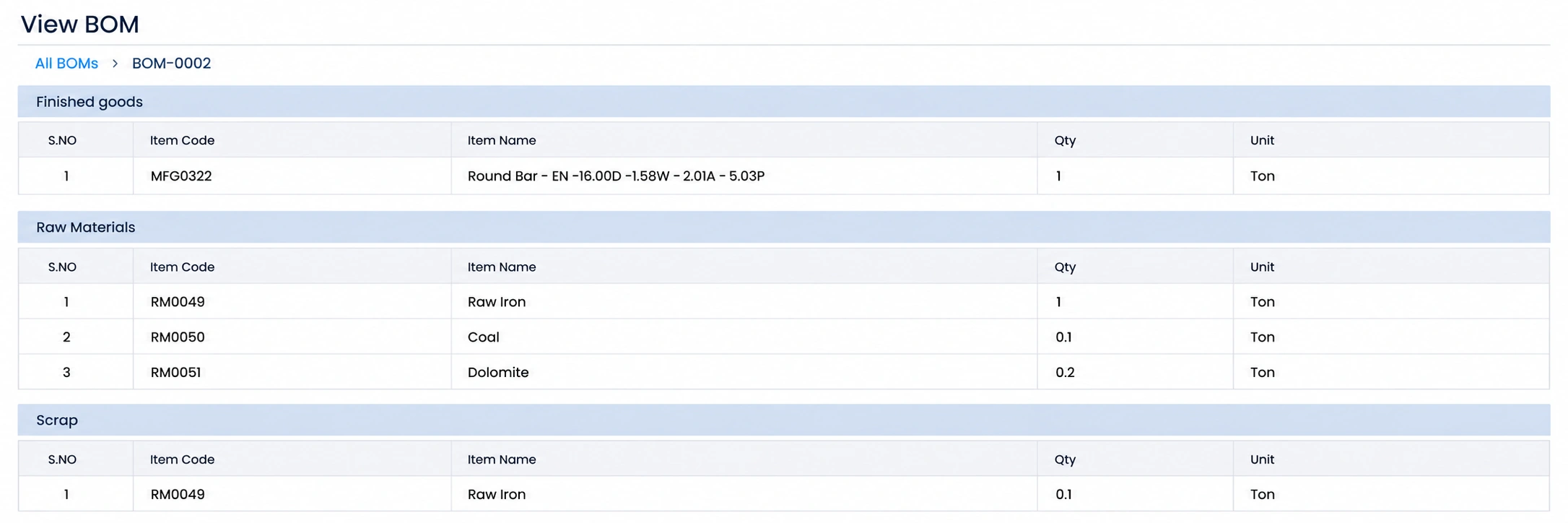
Use a multi-level bill of materials to bring components, sub-assemblies and quantities together. Review the expected material cost before production begins.
For factory owners & production managers
Know what to make, what it uses and what it costs. Bring your BOMs, work orders, material consumption and finished stock into one manufacturing workflow.
₹0 SalesOn account setupMinimum 2 usersMonthly billing availableSupport included
Production teams using SalesOn

Also used by
A production run, from plan to output
Plan the product
Build the material structure before starting the run. Connect raw materials, packaging and sub-assemblies to the finished item.
| Component | Quantity | Rate | Cost |
|---|---|---|---|
| Wheat flour | 120 kg | ₹35/kg | ₹4,200 |
| Sugar | 40 kg | ₹42/kg | ₹1,680 |
| Edible oil | 25 kg | ₹110/kg | ₹2,750 |
| Packaging | 1,000 pcs | ₹2/pc | ₹2,000 |
| Planned materials | ₹10,630 | ||
Follow the work
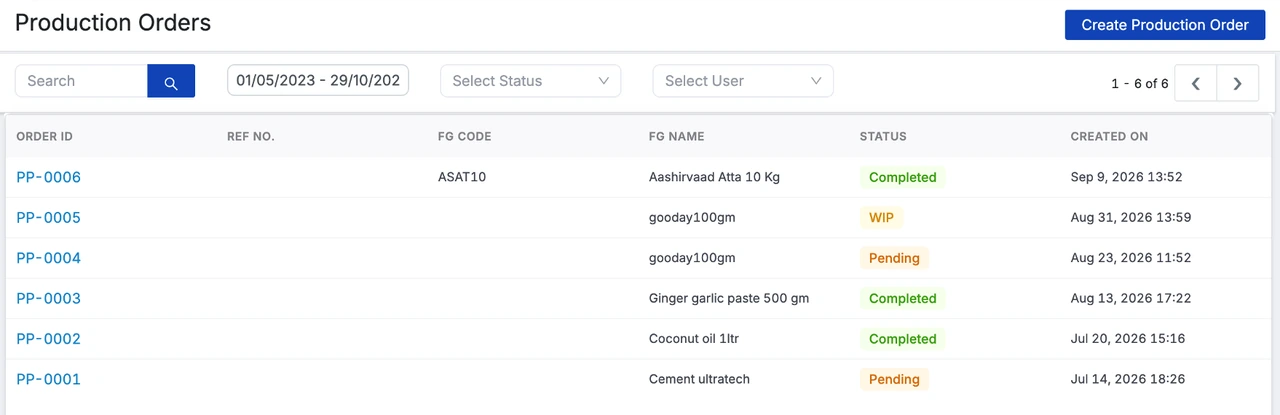
Review each production order with its responsible team. See which stage is complete, in progress or waiting for the next handover.
Mixing team · PO-1042-A
Oven team · PO-1042-B
Packing team · PO-1042-C
Review the result
Compare the plan with recorded costs and output. Make the effect on your cost per unit easy to see.
| Cost component | Planned | Actual |
|---|---|---|
| Materials | ₹10,630 | ₹10,720 |
| Labour | ₹1,800 | ₹1,870 |
| Overhead | ₹1,000 | ₹1,000 |
| Finished output | 1,000 packs | 980 packs |
| Total cost | ₹13,430 | ₹13,590 |
Illustrative workflow and figures, not a product screenshot or performance claim.
Three decisions manufacturers make every day
Use a multi-level bill of materials to bring components, sub-assemblies and quantities together. Review the expected material cost before production begins.
Connect work orders with production stages and teams. Review material consumption, work in progress and recorded scrap as the batch moves forward.
Bring material, labour and overhead costs into the batch review. Compare finished output with the plan and update the finished goods record.
For the people running the factory
Review output, material use and batch costs before making the next production decision.
Follow work orders and sub-processes without piecing together separate team updates.
Keep raw material consumption, finished stock and cost records connected to the same run.
Beyond the factory floor
Connect finished goods with the people managing stock, sales and accounts.
Review finished goods across godowns and follow the customer transaction.
02 / SalesBring available product and stock information into the salesperson’s ordering workflow.
03 / AccountsConnect with accounting and review the production records your accounts team needs.
Before your demo
Bring a real product and batch example. We’ll work through it with your team.
Production management software connects a product’s bill of materials, work orders, material consumption, production costs and finished output. It helps factory owners and production managers review what is planned, what is in progress and what a batch costs.
It is designed for manufacturers managing repeat products, multi-stage production or assembly, with teams that need a shared view of materials, work orders, costs and finished stock.
Yes. A multi-level BOM connects raw materials and sub-assemblies to the finished product. Managers can review the component quantities and costs behind a production order.
A work order defines the finished product and quantity. Production orders organise the sub-processes and their teams, so managers can follow the stages and review their costs against the overall work order.
Batch costing brings the recorded material, labour and overhead costs together for a production run. Dividing that cost by the finished output gives the cost per unit. Scrap and changes in output can affect that result.
Yes. SalesOn connects production with finished goods inventory and its sales workflows. Tally Integration provides the accounting connection. Review the transaction types and mappings your accounts team needs during the demo.
No. SalesOn requires an internet connection and does not support offline use.
Bring one product BOM, a typical work order, your stock locations and a batch cost sheet. We can walk through that example with your production and accounts teams, then discuss users, pricing and onboarding.
Start with one product. Follow one complete run.
Your BOM, your work order and your batch cost—explained with your production and accounts teams.
View plans & pricing ↗ Looking for sales and distribution tools? Explore SalesOn for manufacturers.