Confirm the load
Review the items and quantities assigned to the vehicle before it leaves.
Ready-stock selling · India & Middle East
Give every van a clear stock record. Let salespeople sell, bill and collect at the outlet, while managers review what sold, what came back and what needs attention.
₹0 SalesOn account setupMinimum 2 usersMonthly billing availableSupport included
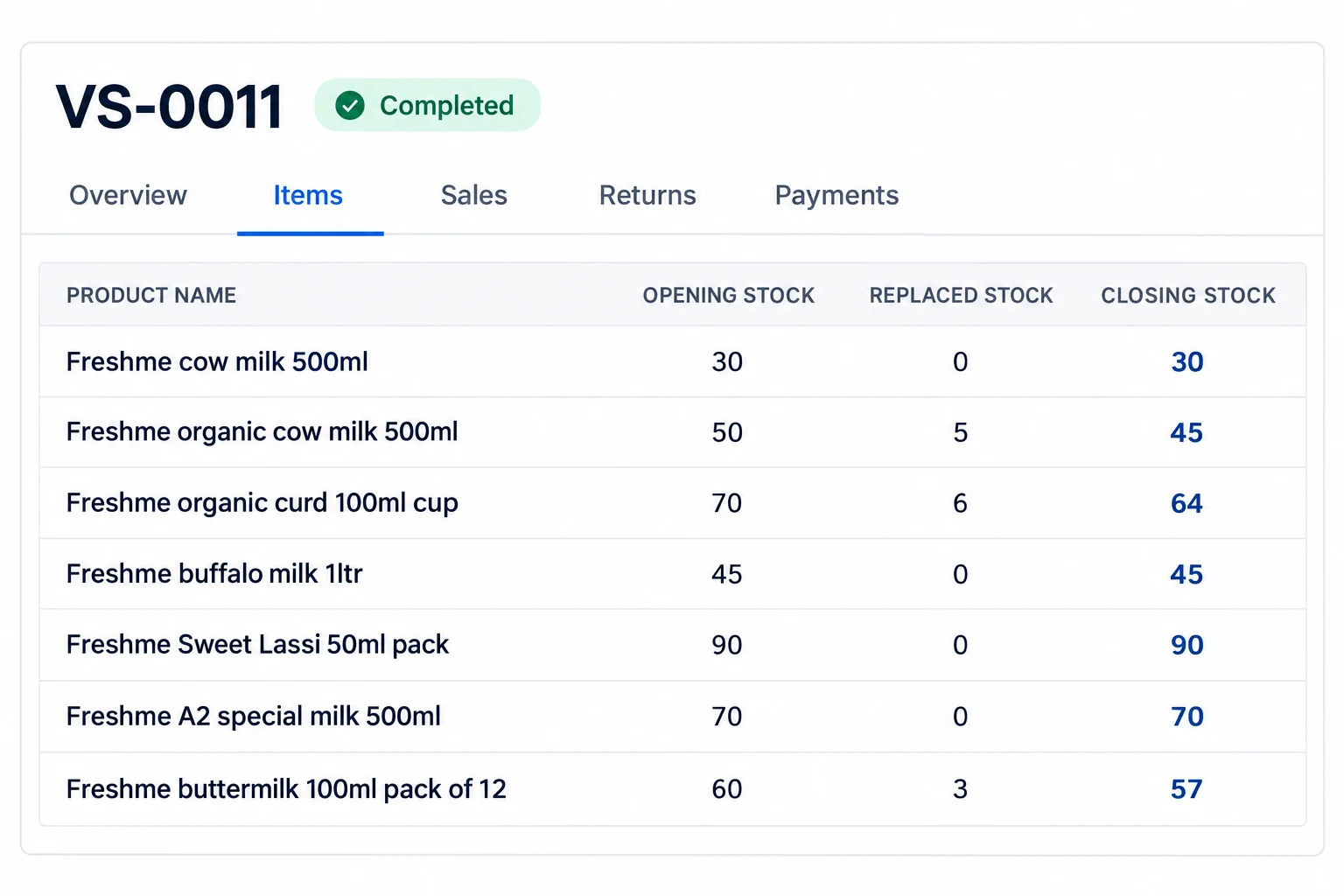
Swipe to see all columns, or enlarge the view ↗
For the supervisorStock and sales by van.
For the salespersonCustomer actions on mobile.
For the officeStock and collection review.
Van sales teams using SalesOn
01 / Before the first outlet
Goods leaving the warehouse need a destination. Keep the load against the right vehicle so the team knows what is available to sell on that route.
Review the items and quantities assigned to the vehicle before it leaves.
Check the selling unit and pack size so a carton is not mistaken for a single piece.
Keep later stock transfers, sales and returns connected to the van’s record.
Need a printable preparation sheet? Use the separate van loading sheet tool ↗
02 / At the customer’s door
Keep the customer, the goods sold and the payment record together while the salesperson is still at the shop.
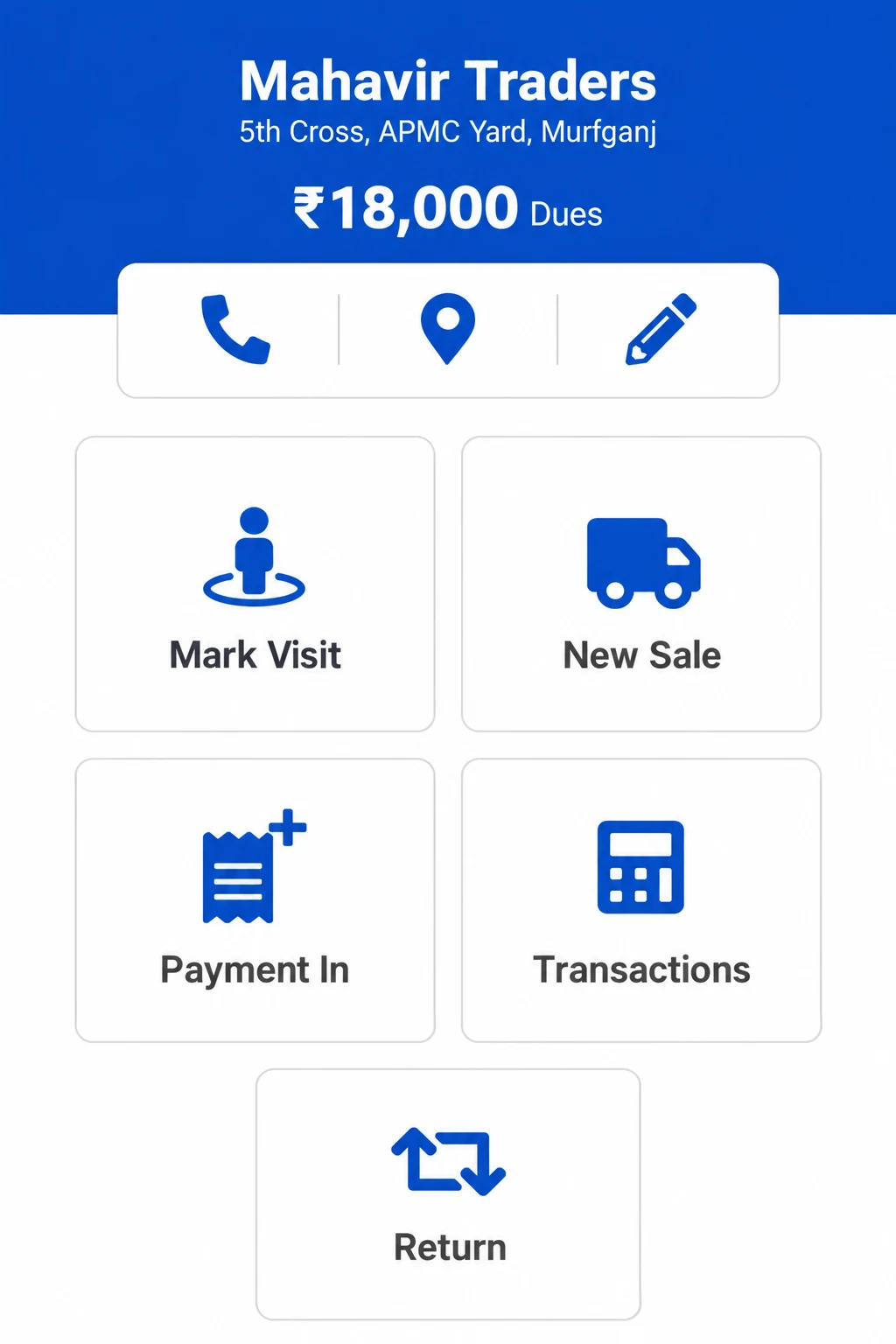
See the account and previous transactions before starting a new sale.
Record the items sold and give the customer their invoice, shared as a PDF or printed in a supported format.
Enter payments and customer returns against the right account. Keep unpaid sales visible as credit.
03 / Back at the office
A good closing review answers two separate questions: does the stock count make sense, and where is the money from the day’s sales?
The saleable count matches the expected 44 units.
Change the count to see a shortage or surplus. One sample item; this calculator is an explanation, not a live SalesOn screen or a saved stock adjustment.
For your distribution business
Whether you distribute FMCG, beverages, dairy or household goods, bring a real route example. Walk through your loading sheet, outlet invoice, return and closing report with the van supervisor and accounts team.
See your van sales workflow in a demo ↗Before you choose
Reps book orders for a later delivery? Explore Order Taking ↗
Drivers fulfil confirmed orders? Explore Delivery Management ↗
Van sales software helps a salesperson sell directly from stock carried on a vehicle. SalesOn connects the van’s stock record with outlet sales, invoices, receipts and returns, so managers can review the route’s stock and collections.
In van sales, the salesperson carries ready stock and sells at the outlet. Order Taking records demand for later fulfilment. Delivery Management handles shipments and trips for confirmed orders. Choose the workflow that matches how the goods reach your customer.
Yes. SalesOn provides a van view with item quantities and tabs for sales, returns and payments. Managers can review individual van records rather than treating all vehicle stock as one warehouse balance.
Review loaded quantities, sales, saleable customer returns and damaged goods for each item. Compare the expected balance with the physical count and investigate any difference. Keep the stock review separate from the review of cash, digital payments and credit sales.
Yes. The mobile customer view provides New Sale, Payment In, Transactions and Return actions. Keep the sale, payment receipt and return against the correct customer; a credit sale is not the same as money collected.
SalesOn supports invoice PDF sharing and supported print formats. For mobile printing, check your printer model, device, paper width and connection during the demo. Printer compatibility should be verified before rollout.
SalesOn can be evaluated for ready-stock selling in these markets. Bring your currency, customer and item data, tax invoice example, language requirements and printer details to the demo. Ask the team to demonstrate your country-specific setup and any required e-invoicing connection; this page does not promise local regulatory certification.
No. SalesOn requires an internet connection and does not support offline use. Check connectivity on the routes where your salespeople will use the app.
SalesOn offers Tally integration. Review the enabled transaction flows, customer and item mappings, and posting requirements with your accounts team. The Tally Integration page explains the accounting connection separately.
Bring one loading sheet, a typical outlet invoice, a customer return and your closing stock or cash report. Include the van supervisor and accounts team so you can walk through one complete route using your own working examples.
Bring one route. Review the whole day.
From the first load to the final stock and collection review.
How to Reconcile Van Stock, Cash and Returns. Includes a downloadable stock and cash checklist.