For HR & field sales managers
Field attendance, recorded clearly.
Record photo and GPS check-ins, check-outs and odometer readings in the SalesOn app. Review work hours, late check-ins and partial working hours in one attendance dashboard.
₹0 SalesOn account setupMinimum 2 usersMonthly billing availableSupport included
7-day Pro trial · Subscription terms · Refund policy
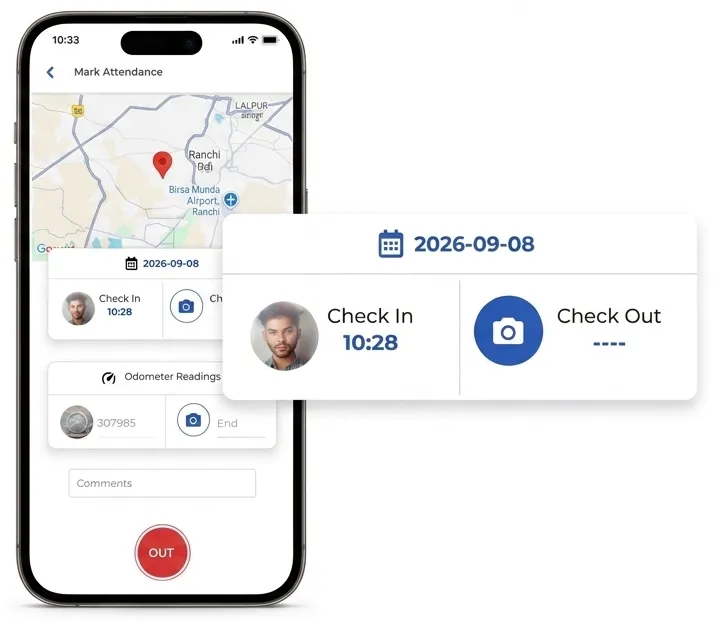
From check-in to the attendance report.
From the employee’s check-in to the manager’s attendance review.
Record the start and end of the day.
Open an employee’s check-in record to review the time, photo, location and odometer reading. Keep the start and end of the working day in the attendance record.
- Photo and location: Review the details attached to the check-in.
- Odometer readings: Keep start and end readings with the day’s attendance.
- One employee app: Mark attendance in the same SalesOn app used for field work.
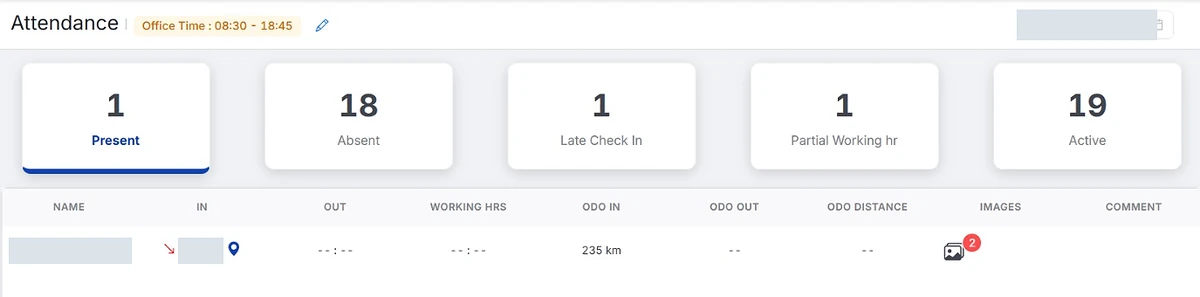
Illustrative attendance review · Office start 09:00
Check the exception behind the count.
- Check-in
- 09:52
- Late by
- 52 minutes
- Check-out
- Not recorded
A missing check-out needs review before the working hours are finalised. This is a sample, not a live employee record.
See working hours and late check-ins.
See the recorded check-in and check-out times alongside calculated working hours. Review late check-ins and partial working hours before finalising attendance.
- Auto Work-Hours Calculation: No manual timesheets — hours, late marks, and half-days computed automatically.
- Automatic Late-Mark Flagging: Reps arriving past shift start time are flagged automatically — no manual checking against the register.
- Half-Day & Shortfall Detection: Hours short of a full shift are auto-marked, with manager visibility across the team.
- Attendance Export: Export attendance and work-hour records for HR to review before payroll.
Attendance Software — FAQ
A field employee attendance app records check-in and check-out from the employee’s phone. SalesOn brings photo and GPS details, odometer readings, work hours and attendance status into one manager view.
Review the photo, time, GPS location and odometer readings attached to the attendance record. These details support the review; a location point alone does not establish that customer work took place.
Attendance covers check-in, check-out, working hours and late or partial-hour records. Salesman Tracking covers the team map, date-wise routes and recorded customer activity.
The attendance view shows late check-ins and partial working hours alongside the employee’s recorded times. Review the applicable office timings and attendance rules with the SalesOn team during setup.
Export attendance and work-hour records for HR to review before payroll. Confirm the required fields and format with your payroll team; this page does not promise a direct integration with every payroll system.
No. SalesOn requires an internet connection and does not support offline use.
SalesOn is a paid product with a free 7-day trial. See current plans and trial terms. SalesOn account setup is free. Optional Tally auto-sync is priced separately. Paid subscriptions require a minimum of 2 users.
Attendance Is Just the Start
SalesOn connects the full field operations loop — attendance, visits, orders, billing, and expenses.
Review your team’s attendance in SalesOn.
Bring check-ins, check-outs and work-hour records together for your field team.