For sales managers & finance teams
Field sales expenses.
Ready for a proper review.
Expense management software for travel, TA/DA and everyday field claims. Bring receipts, policy checks and approval decisions into one place, so your accounts team can prepare reimbursements.
Book an expense management demo ↗See the sample policy review ↓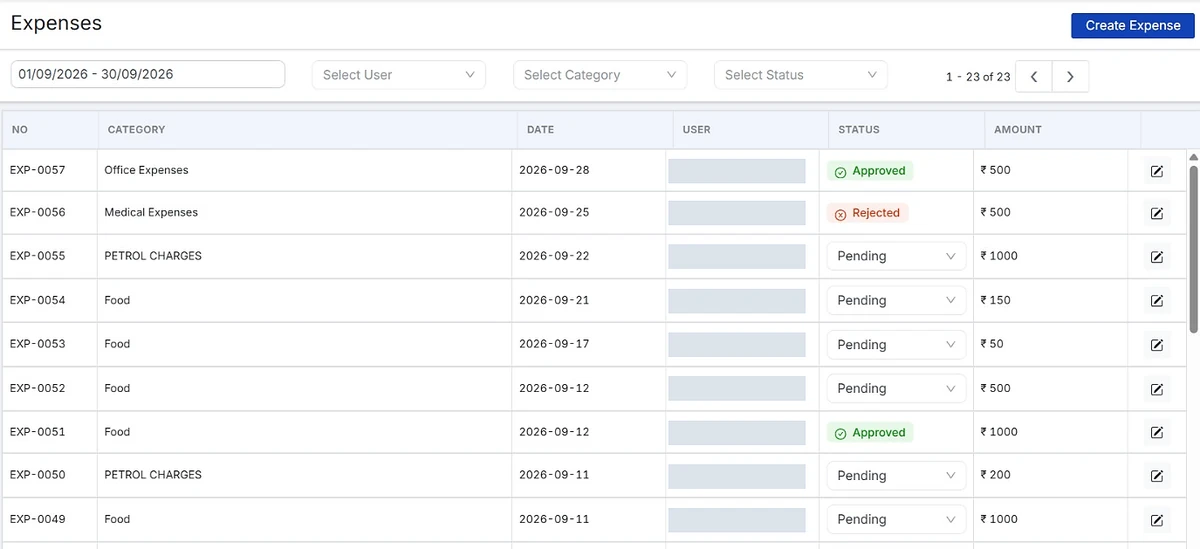
Swipe to see all columns, or enlarge the view.
One claim. Three responsibilities.
From the mobile entry
to the office review.
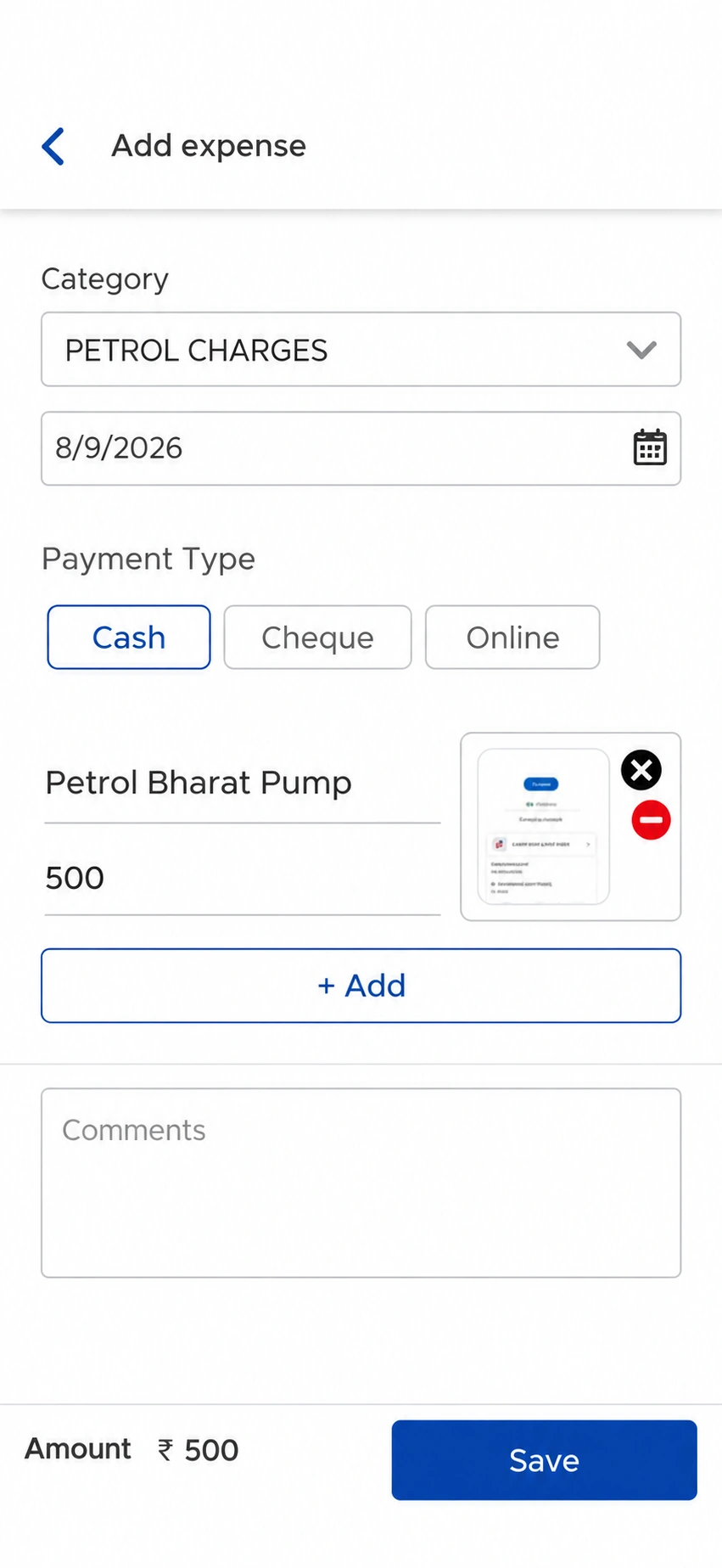
Keep the expense details and supporting bill together, then give the claim a clear next step.
-
01
The salesperson submits
Record the expense category and amount, add the relevant details and attach a photograph of the bill from the mobile app.
-
02
The manager decides
Review the claim against policy limits. Check supporting information and approve or reject with a comment. Route claims through additional approval levels when needed.
-
03
Accounts prepares reimbursement
Use approved expense records for the reimbursement review. Keep the approval decision separate from the payment your accounts team makes.
Your policy, in the review
Check the rule.
Understand the exception.
Give managers the context behind an amount, rather than another total to approve.
A closer look at each claim.
Choose a claim to see its amount, supporting detail and policy check.
Rahul Kumar
- Claimed amount
- ₹620
- Calculation
- 62 km × ₹10/km
- Policy check
- Matches the travel rate
- Submitted for
- 26 October · Local travel
Check the journey details before recording your decision.
62 km submitted for the day’s field travel.
Illustrative rules and amounts. Your company sets its own expense policy.
For manufacturers & distributors
A useful record for
the people reviewing spend.
Regional sales managers need to review their team’s field claims. Finance needs approved expense information for reimbursement. Give both teams a consistent starting point.
Review the claim, not a message thread.
Bring the salesperson, expense category, amount and supporting bill into the same review.
Work from approved expense records.
Review team and rep-wise expenses. Use the approved records to prepare the reimbursement handover.
Before your demo
Expense management.
Practical answers.
It helps salespeople submit work-related expenses and helps managers review claims, receipts and policy limits. Approved expense records support the accounts team’s reimbursement process.
The expense workflow covers travel, fuel, daily allowances, food, lodging and miscellaneous field expenses. Set the categories and applicable limits around your company’s reimbursement policy.
Configure per-kilometre travel rates, daily allowance caps and category limits. Claims are checked against the applicable rules, with exceptions highlighted for manager review.
Yes. Reps can attach receipt photographs to claims. Managers can review the submitted amount, category and supporting information before deciding whether to approve or reject.
Yes. Multi-level approval can route claims according to your configured value or category rules. Review your approver structure and exception process during the demo.
No. Approval records the expense decision. Your accounts team handles reimbursement according to your payment process and schedule. SalesOn does not promise same-day payment.
Expense Management focuses on claims and approval. Attendance handles attendance records; Salesman Tracking handles location and route history; the Tally Integration page explains accounting connections. These remain separate workflows.
No. SalesOn requires an internet connection and does not support offline use.
Bring a sample expense sheet, receipt, travel rate, daily allowance policy and approval hierarchy. We can walk through a typical claim and discuss reports, exports and any accounting requirements with your team.
Bring one receipt and your expense policy
Walk through a real
expense review with us.
See how your categories, rates and approval hierarchy fit SalesOn.