📍 Live Team Location 🧭 Date-Wise Activity Timeline

Salesman Tracking App for Live Location and Daily Activity Logs

See where every field salesman is now, then open any employee and date to review the route travelled, distance covered, total field time and the complete activity timeline. SalesOn turns location data into a manager-ready salesman tracking system — not just another moving dot on a map.

✔ 1,100+ Indian businesses  ·  ✔ Android & iOS  ·  ✔ ₹0 setup fee  ·  ✔ No minimum users
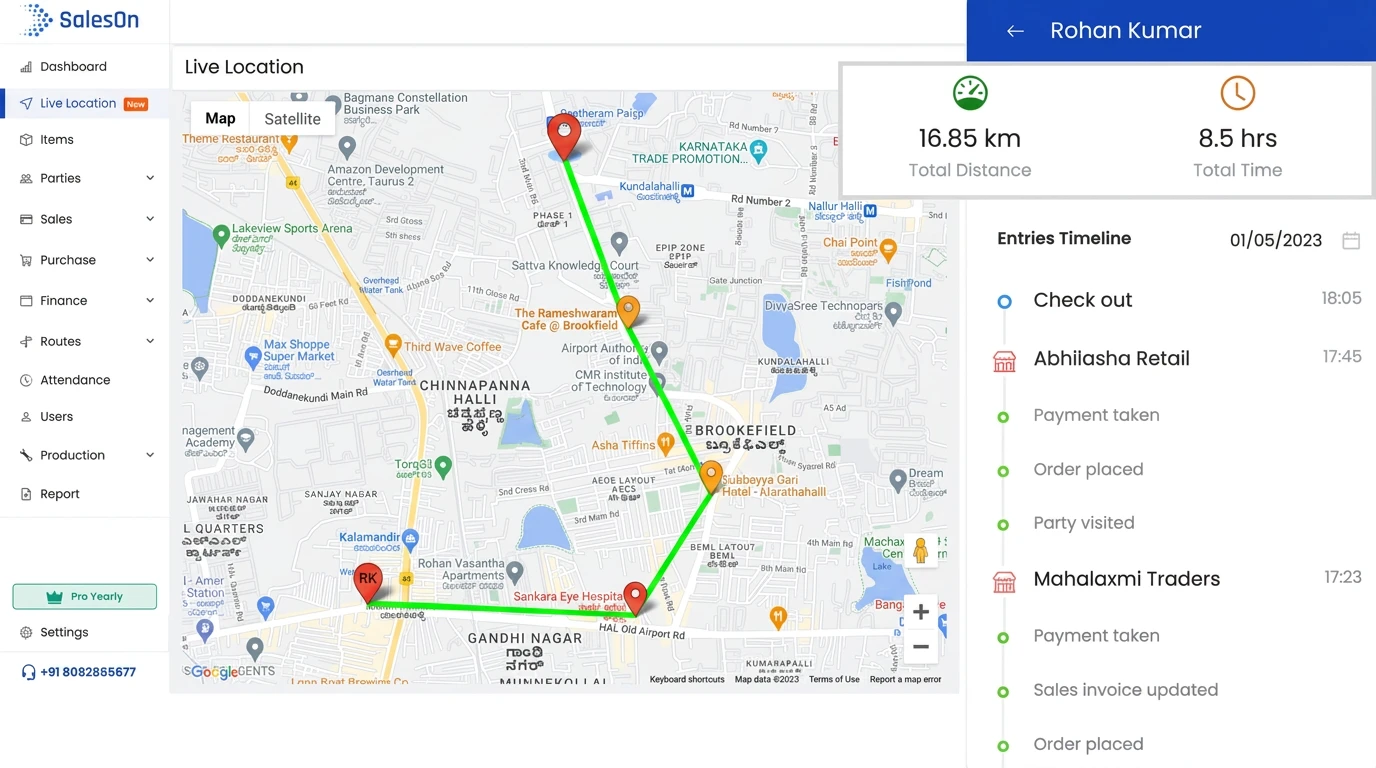
Clear page ownership: this page covers live employee location, route history, distance, field time and activity logs.
SalesOn — Activity Log Dashboard
SalesOn salesman tracking dashboard showing route map, distance, field time and daily activity log

Trusted across FMCG, Pharma, Electronics, Hardware and Distribution

RAPOO INDIAWAYCOOLLAPCAREINDIAN OILFUJITECH
The Visibility Gap

A Live Pin Shows Where the Phone Is. It Does Not Explain the Day.

Managers need current location, history and business context together. Otherwise every review still ends in phone calls and memory-based explanations.

📍
Current Location Without History
A live location link disappears. You cannot reliably review where the salesman travelled last Tuesday or how the day unfolded.
No Audit Trail
🧩
Movement Without Business Context
A route line alone does not show which outlet was visited, whether an order was placed, a payment was taken or an invoice was updated.
No Work Context
📞
Daily Review Still Needs Calls
Without a user-wise day summary, managers chase each rep for start time, distance, customer activity and end-of-day updates.
Manual Follow-Up

Know Where the Team Is Now. Understand What Happened Later.

SalesOn salesman tracking software combines a live team map with employee-wise route and activity history. This gives sales managers immediate visibility during the day and a dependable record for review after the day ends.

🗺️

All Salesmen on One Live Map

View the latest known location of your authorised field users from a single manager dashboard instead of opening separate location links.

👤

Employee-Wise Location View

Select one salesman to focus on their current position, route travelled and recorded activity for the chosen date.

📅

Date-Wise Route History

Go back to an earlier date and review the path travelled instead of depending on screenshots, memory or end-of-day messages.

📏

Automatic Distance Calculation

See the distance recorded for the field day without manually calculating routes from map points or odometer messages.

⏱️

Total Field-Time Summary

Review the total time covered in the selected day alongside the route and activity timeline. Formal attendance rules remain on the Attendance page.

🧾

Salesman Activity Log

See customer visits and recorded business events in chronological order, including orders, payments, invoice updates and day-end activity.

📍 Live Location Tracking

Open One Map and See the Field Team Without Calling Anyone

The manager view shows field salesmen together on a Google Map with employee names and their latest recorded location. Select a user when you need a closer view instead of asking every rep to share a separate WhatsApp location.

That makes live salesman tracking useful for daily supervision: checking whether the team has started moving, locating the right rep when a customer calls, and understanding which area each employee is covering at that moment.
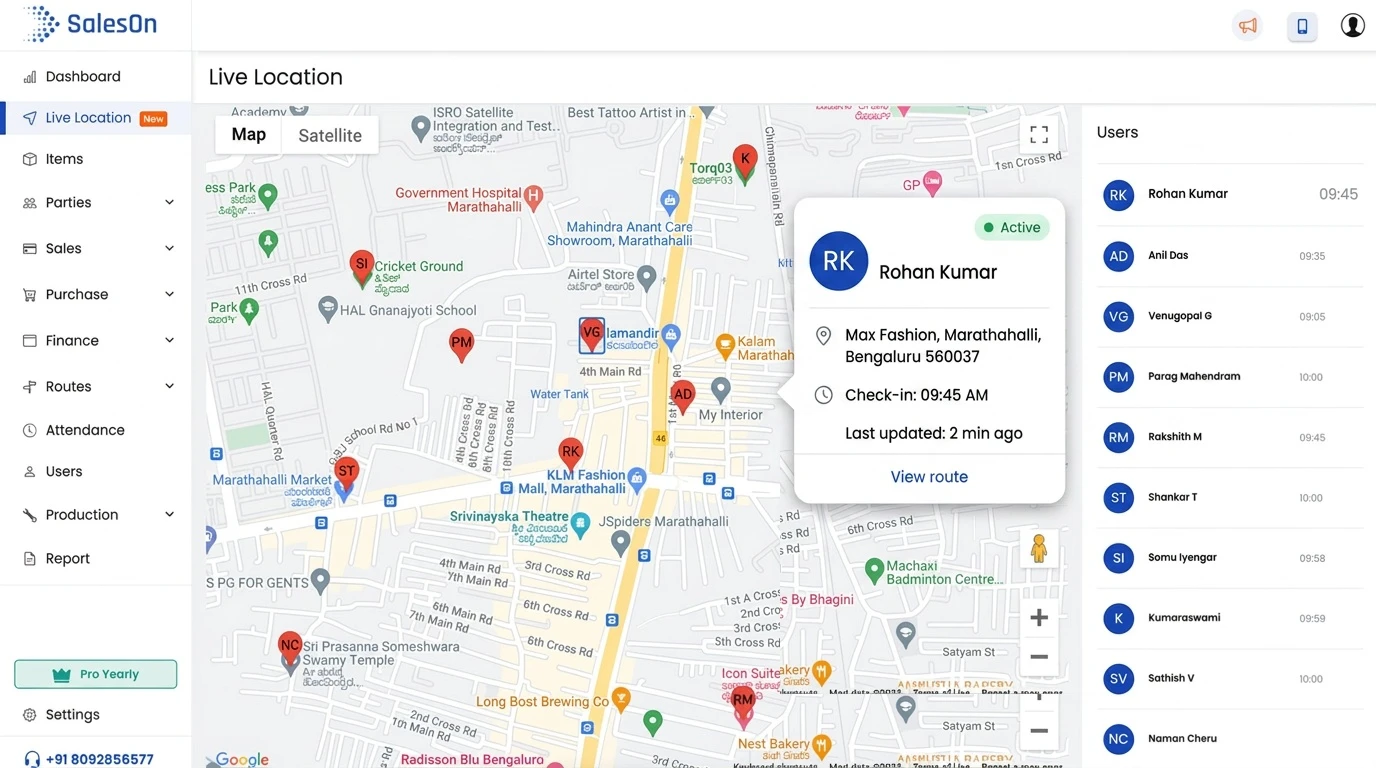
✓ Best used for current visibility. Date-wise history and activity evidence are available when you open an individual salesman.
SalesOn — Live Location Dashboard
SalesOn salesman tracking dashboard showing route map, distance, field time and daily activity log
🧭 Daily Activity Log

Reconstruct the Field Day from Start to Finish

The salesman activity log is where tracking becomes operationally useful. Choose a user and date to view the route map, total distance, total time and a chronological timeline of activities recorded during the day.

Customer visits, orders, payments and invoice updates can appear as events in the same timeline. SalesOn does not replace the dedicated order-taking or payment workflows on this page; it shows those events as evidence of what happened during the tracked day.

✓ Activity logs belong here because they explain movement. Detailed order capture belongs on the Order Taking App page.
Rohan Kumar — Daily Activity
Selected date: 01 May · 16.85 km · 8.5 hours
Synced
09:35
Field day started
First location and movement recorded
10:42
Mahalaxmi Traders visited
Order placed · sales invoice updated
14:18
Abhilasha Retail visited
Payment taken · order placed
18:05
Field day completed
Route, distance, time and events stored for review
Manager Workflow

Use Live Location During the Day. Use the Timeline for Review and Coaching.

Good salesman tracking software should support two different manager moments: an immediate question such as “Where is the team now?” and a review question such as “What happened during this employee’s day?”

1
Open the team map
See authorised field users and their latest recorded positions together.
2
Select a salesman
Move from the team view to an employee-specific route and day summary.
3
Choose the date
Review today or an earlier date without asking the rep to recreate the day.
4
Read movement and activity together
Use route, distance, time and recorded business events for a factual review.
What the manager can answer
Live Question
Where is each salesman now?
Use the team map and employee list.
RK
Rohan Kumar
Latest location recorded at 09:45
View Map
AD
Anil Das
Location updated at 09:35
Active
After-day review
Route historyDistanceField timeActivity timeline

Looking for a Free Salesman Tracking App?

SalesOn is not positioned as permanently free salesman tracking software. It provides a free 7-day trial so your business can test the live team map, employee-wise history, distance, field time and activity logs using a real workflow before selecting a paid plan.

✓ No setup fee
✓ No minimum number of users
✓ Android and iOS app
✓ Manager dashboard on web

How to Choose the Best Salesman Tracking App

“Best” depends on what your manager needs to verify. For distribution teams, the useful question is not only whether an app shows a live pin, but whether it creates a reliable day record connected to field work.

One map for the full teamManagers should not need separate links or individual screenshots.
Date-wise employee historyYou should be able to review an earlier date, not only the current moment.
Distance and field-time summaryBasic movement metrics should be calculated automatically.
Activity logs with business eventsThe timeline should connect location with visits, orders and payments recorded in the system.
Clear employee and admin accessTracking should apply to company-assigned users with authorised manager visibility.
A real trial before purchaseTest the app with your own field routine before paying for a long commitment.

SalesOn vs WhatsApp Location Sharing vs a Basic GPS App

Capability SalesOn Tracking WhatsApp Location Basic GPS Tracker
See the full team together ✓ One manager map Usually separate links Varies by tool
Review an earlier date ✓ Employee-wise date history Limited or link-dependent Often location history only
Route travelled ✓ Map view for selected day Not a manager-ready route record Usually available
Distance and total field time ✓ Calculated in the day summary No business summary May show movement metrics
Customer and sales activity timeline ✓ Visits, orders, payments and updates ✗ Location only ✗ Movement only
Connected with SalesOn workflows ✓ Same platform ✗ Separate messaging app ✗ Separate tracking tool

A dedicated GPS app may be suitable when you only need movement history. SalesOn is designed for businesses that want location and field-sales activity in the same operational system.

Watch SalesOn Activity Logs and Live Location Tracking

These SalesOn product videos show the two core experiences this page is built around: reviewing a salesman’s activity log and viewing live location.

Salesman Activity Log in SalesOn

See how a manager reviews date-wise activities and uses the timeline to understand the employee’s field day.

Salesman Live Location Tracking in SalesOn

See the live location experience used to view on-field employees from the manager dashboard.

Tracking Verifies the Day. Other Modules Manage the Work.

Each SalesOn page owns a different search intent. This keeps the salesman tracking page focused and gives visitors a clear next step when they need a specialist workflow.

This Page

Salesman Tracking

Live location, route history, distance, field time and activity timeline.

Current page
Broader Workflow

Field Sales Management

Customer work, outlet context, new-outlet capture, sync and manager-level field workflow.

Explore field sales →
Transaction Workflow

Order Taking App

Digital catalogue, SKU search, customer pricing, schemes and order capture.

Explore order taking →
Vehicle Stock

Van Sales

Van inventory, ready-stock route selling, outlet billing and EOD reconciliation.

Explore van sales →

Salesman Tracking App — FAQ

A salesman tracking app gives authorised managers live visibility of field salesmen and stores date-wise location and activity history. SalesOn shows the team on one map, an individual salesman’s route travelled, distance, field time and a timeline of recorded customer visits, orders, payments and other field events.
SalesOn is not a permanently free salesman tracking app. Businesses can use a free 7-day trial to test live location, route history and activity logs before choosing a paid plan. There is no setup fee and no minimum user requirement.
Yes. SalesOn is built for Indian distributors, manufacturers and field sales teams. Managers use the web dashboard while company-assigned salesmen use the Android or iOS app during field work.
Yes. Managers can select a salesman and date to review the route travelled, location history, distance covered, total field time and the activity timeline recorded during that day.
Salesman tracking focuses on location visibility, route history, distance, field time and daily activity evidence. Field sales management covers the broader customer-work workflow. Order taking, attendance, collections and targets also have dedicated SalesOn pages and modules.
Salesman tracking explains where a rep moved and what field events were recorded during the day. Attendance software focuses on check-in, check-out, present or absent status, late marks, work-hour rules and payroll-ready reporting.
Look for a live team map, employee-wise location history, date filters, automatic distance and time calculation, business activity logs, manager access controls, reliable mobile sync and a transparent trial. A basic location-sharing app usually does not connect movement with customer and sales activity.

Add the Workflow Your Team Needs Next

📍 Live location + route history + activity logs

Stop Asking Where the Team Is — Open SalesOn.

Test the salesman tracking app with your own field team for 7 days. No setup fee and no minimum users.

🚀 Start Free 7-Day Trial
Android & iOS · Web manager dashboard · Built for Indian distribution teams