
Set up your SalesOn workspace
3:10Start with the setup walkthrough before your team begins daily work.
Learn SalesOn, one task at a time
Set up your workspace, guide your team through daily work and find a practical answer when something gets in the way.
Ready to follow along? Log in to SalesOn ↗
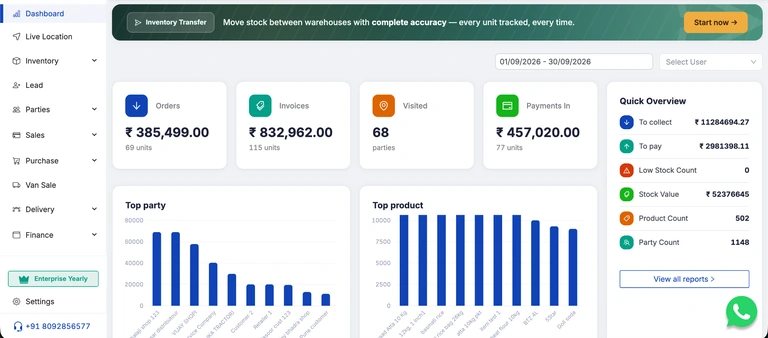
Use this checklist while you work in your account. Mark a step after you have completed and checked it.
0 of 3 marked by you.
Check item codes, units, prices and applicable tax details with your administrator.
Use the account and permissions agreed with your administrator.
Review the customer, line items and resulting records before wider use.
Progress is self-reported and saved only in this browser. Account activity is not verified.
The video library
Videos open in a Google Drive player when you choose Watch guide. You can also open any video directly in Drive.
8 guides
Start with the setup walkthrough before your team begins daily work.

Use the business review walkthrough when you are ready to review recorded activity.

Learn where to look when you need help using SalesOn.

Watch the attendance walkthrough before your first check-in.

Follow the password recovery walkthrough to regain access.

Watch the guide for an accidental attendance checkout.

Use this guide when the product you expect is not visible.

Use this guide when the route you expect is not visible.
No matching guides. Try a shorter search, choose All guides, or ask support.
For owners & managers
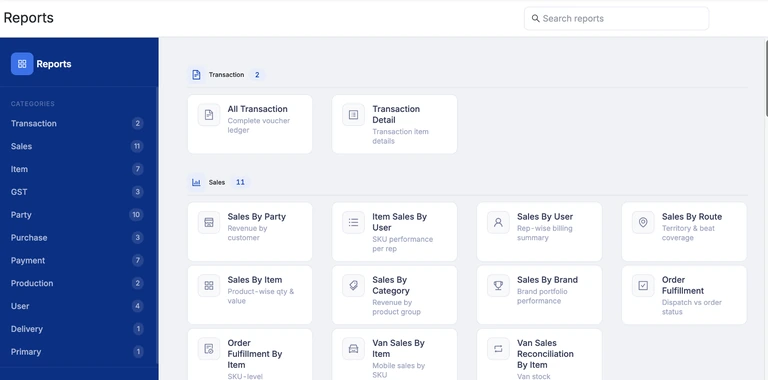
Use the Reports workspace to find the report you need. For an overview of the connected workflows, explore DMS, field sales or production.
SalesOn needs an internet connection. Available screens depend on your plan and account permissions.
Still need a hand?
Tell us which screen you are using and what you expected to happen. Include the error message if there is one.
Onboarding, training and standard support are included with both plans. Companies with 11 or more paid users also receive a dedicated account manager.
Hide customer details in screenshots. Never send passwords or OTPs.